Showing posts with label Flash. Show all posts

15 May 2011

Bắt đầu với Molehill (Stage3D) - Phần 2

[This is a translation and edit of the article “Molehill Getting Started” from labs.jam3.ca]

PHẦN 2. TÌM HIỂU MOLEHILL (STAGE3D) API

Trình độ: Cao CấpPhần mềmFile mẫu
- Vững ActionScript 3
- Biết FlashDevelop
- Biết Flash 3D hoặc 3D Engine
- Flash Develop 4 (tải về)
- Flex SDK 4.5 r.19786 (tải về)
molehill_getting_start_p2.zip


(TTT) Đây là bài viết giới thiệu về Molehill (Stage3D) API ở khía cạnh cơ bản của nó. Molehill API là một tập lệnh cấp thấp nên đòi hỏi bạn phải vững về ActionScript 3 và có chút kinh nghiệm về 3D (Flash) để có thể dễ dàng tiếp cận hơn.

(Dịch)
Trước khi chúng ta bắt đầu, có một số thuật ngữ các bạn nên biết:

Các thuật ngữ:

  • Vertex: Một điểm trong không gian 3D. Một vertex sẽ xác định đỉnh của một tam giác. Tuy nhiên trong MoleHill, vertex định nghĩa cả vị trí và màu của đỉnh.
  • Matrix: Bạn dùng Matrix (ma trận) để biến đổi các Vertex. Hãy hình dung Matrix giống như là các "phương trình" để xoay, thay đổi tỉ lệ hoặc thay đổi vị trí của Vertex.
  • Shader: Shader là một chương trình nhỏ dùng để xử lý Vertex. Shader có thể dùng Matrix để làm các phép biến đổi lên Vertex. (Hay nói cách khác, chương trình thực thi một phương trình lên tất cả các điểm trong 3D). Không như tôi nghĩ, Shader trong MoleHill không chỉ xử lý hoa văn và giao diện mà nó còn dùng để xử lý vị trí của các đối tượng.
Bây giờ chúng ta có thể bắt đầu xem xét các thành phần tạo nên MoleHill

06 May 2011

Bắt đầu với Molehill - Phần 1

[This tutorial discusses How to get started with Molehill API via Away3D. You can find English equivalents from other sources easily]

PHẦN 1. TIẾP CẬN MOLEHILL THÔNG QUA FLASH ENGINE AWAY3D


Trình độ: Trung CấpPhần mềmFile mẫu
- ActionScript 3
- Biết FlashDevelop
- Từng sử dụng Flash 3D engine
- Flash Develop 4 (tải về)
- Flex SDK 4.5 r.19786 (tải về)
molehill_getting_start_p1.zip

I. Molehill và những câu hỏi thường gặp.


1. Molehill là gì?
Molehill là tên mã của một tập lệnh (API) cấp thấp trong Flash Player cho phép tận dụng sức mạnh của chip đồ họa (GPU) để hiển thị hình ảnh 3D phức tạp và các hiệu ứng đồ họa đòi hỏi tốc độ xử lý cực nhanh, từ đó mang lại cho người dụng trải nghiệm 3D ấn tượng trên hầu hết các máy tính và thiết bị kết nối internet.

Dự kiến Molehill sẽ được phát hành chính thức trong Flash Player 11 và Adobe AIR phiên bản tiếp theo.

Ảnh: Ứng dụng demo Max Racer viết bằng engine Alternativa 3D hỗ trợ Molehill. Xem demo. 

22 February 2011

AS3 Wordle Tag Cloud

Wordle Tag Cloud
You should have seen the aesthetic tag cloud above somewhere on the web. It originates from the famous Wordle words cloud (closed source). For the past few days, I have ported an open source Java class to ActionScript and able to render the tag cloud in Flash as seen above. Please refer to this article to have the Java author explain the basic of the algorithm. (Thank Pierre Lindenbaum for the nice implementation)

15 February 2011

Flash on multiple screen demo

2011 undoubtedly expects the multiple screen applications trend. Flash platform is one of the best solutions to deliver same experience across multiple devices and platforms. Here is a demo of Flash-based games on multiple (device) screens: PC, iPhone, iPad, Android phone (Motorola Milestone 2), Android tablet (Samsung Galaxy Tab).

All the coding effort is credited to my Flash team. The iOS applications were created by using Flash CS5’s iPhone Packager. I repackaged the Flash builds to AIR for Android using Flex SDK Hero. Some of the applications are not complete and/or Android-optimized yet.

FYI, the video was created with Cinelerra, the most advanced non-linear video editor and compositor for Linux. (Quite close to Adobe Premiere, and require some learning curve)

25 December 2010

Project Snow Fight

Snow Fight Game
Another internal case-study project of Pyco Flash team to research multiplayer game with Red5. This is a 2D top-view real-time shooting game whose gameplay is similar to CS2D – you control your character moving round with WASD keys and aim and shoot with your mouse. The game showcases real-time synchronization among clients in a precision and fast-pace environment. The team have learnt a lot from the book ActionScript for Multiplayer Games and Virtual Worlds and apply what we learnt successfully to this game.
I designed and proposed the game concept and detailed requirements. I also joint to develop the character control and foundation of client-server synchronization.
My roles: system designer, technical supporter
Tech notes:
Click here to try the game. (Because this is a multi-player game, make sure you invite your friends to join).
Login screen Battle room screen Game over screen

05 December 2010

Flash Camp Hanoi 2010

The young and energetic people
It was great honor for me to be invited to the first Flash conference in Viet Nam, Flash Camp Hanoi 2010. The event is a proving fact that Flash/Flex users community in Viet Nam has grown up and stronger than ever. All details and stories can be found at the official website: flashcamphanoi.com.vn 
(Update: the server is temporarily down, please access the overview article on groups.adobe.com or view the event photos on FCH Facebook page)

Me on stage
I brought to the event the presentation about FLARToolKit and augmented reality in Flash. The slide deck (with links to online demos) has been uploaded by the organizer on slideshare.net.

08 October 2010

Presentation: Introduction to TDD & FlexUnit

This is a summary of what I studied and practiced with TDD & FlexUnit. This presentation is not for persuading developers applying unit testing but it will highlight benefits & vulnerabilities of TDD objectively.

[Vietnamese tag: Bài thuyết trình về FlexUnit và mô hình phát triển phần mềm dựa trên kiểm thử / kiểm tra]

13 September 2010

Quick AS3 Language Reference Search with Google Chrome’s custom search engine

ActionScript 3 language reference document is any Flash developer’s bible. Whenever you implement something with Flash, you’ll find yourself checking this document regularly. There are plenty of ways to access this document:

  1. Open Flash CS* and press F1 to open it’s internal help panel. (Some of my friends do this even when they don’t have any fla to edit).
  2. In FlashDevelop, place the caret on a Flash built-in class name and press F1. FD will open the default browser with Google search results within AS3 language reference’s site. (This requires you to open FlashDevelop anyway).
  3. Bookmark this site: http://www.adobe.com/livedocs/flash/9.0/actionscriptlangrefv3/ (Flash Player 9 AS3 & Flash CS3 components) or this: http://help.adobe.com/en_US/AS3LCR/Flash_10.0/ (Flash Player 10 AS3 & Flash CS4 components) and open it with your favorite browser. Then you’ll need to browse through the classes list.
  4. Download this offline FlashCS4 help document and open the index.html file locally with your favorite browser. You’ll also need to browse through the classes list.
    You can also bookmark this local document for quick access.

Now, if you’re using Google Chrome, let me propose another way not only help access the online document quickly but also allow to search for a specific term or class with lightning speed!

28 August 2010

Announcing as3-karaoke-player, my first open library

Today I’m very excited to announce my first open source library: as3-karaoke-player. It comes from a request to make a small karaoke website. The idea is that karaoke is a popular kind of entertainment in Vietnam so I thought I would make the core rendering engine open source so that everyone especially my fellow developers can make and/or enjoy karaoke online. (About the said karaoke site, of course I only charged the GUI customization and the Red5 recorder)

You can check out or download the source at Google Code site: http://code.google.com/p/as3-karaoke-player/. This library is licensed under Apache License 2.0.

Here's the sample player:


(The background photo is taken by me :P )

01 July 2010

Myth Buster: EnterFrame Event Performance

When dealing with animation and tweening in ActionScript, EnterFrame event is the most important factor. However, it is also one of the frequent factors to cause performance issue for your application. Using it efficiently is critical for every application.

The myths

The EnterFrame events reportedly generate 1500 – 1800 event objects per minutes. Imagine, in every instance of your component (for e.g. a text marquee), you add an EnterFrame handler to its own, that number of objects generated per minute will multiply. Keep in mind that, creating an object is one of the slow actions in ActionScript. So avoid creating too many event objects will theoretically improve application performance.

When discussing AS3Signals, I have mentioned an approach (raised by Robert Penner and AlecMcE) which uses a two-frame MovieClip which has some script attached to its frames. The MovieClip loops continuously between 2 frames. When the play head reach a frame, the script attached to it will call the handling function, imitating EnterFrame’s events. Some claims that: “The idea behind the approach is that a frame-loop is an internal Flash player structure. It sits underneath the AS3 functionality, and so it doesn’t produce ENTER_FRAME events”.

The experiments

demo

To clear the myths about EnterFrame event performance and the 2-frame-loop approach, I have constructed an experiment of moving 5000 objects simultaneously using 4 different approaches:

08 June 2010

Optimal Unicode range for Vietnamese font libraries

As an old-school tip, in order to display correct Vietnamese Unicode characters, we must include these character sets: Basic Latin + Latin I + Latin Extended A + Latin Extended Additional.

Although those 4 sets contain 994 glyphs, Vietnamese characters scatter in those sets and only take about one third of that number of glyphs. It is a waste to include other Latin characters that Vietnamese language never uses.

So I’ve done a quick experiment and come up with an optimal unicode range for Vietnamese characters (for [Embed] tags and compiled with Flex SDK):

18 May 2010

Demystify the “root” property of DisplayObject

Every DisplayObject has a property named “root”. What does this property refer to? Do all display objects share the same root object?

According to Adobe’s Help, the root property is the top-most display object in the portion of the display list's tree structure represented by that SWF file. In other words, root is the document class of that SWF. (By saying document class, I mean the movie clip that is linked with document class in Flash CS or the target class which you compile with Flex SDK)

There are other cases mentioned in the document:

  • Root of Stage is the Stage itself.
  • Root of a loaded image (jpg, png, gif) whose content is a Bitmap is the Bitmap.
  • If a DisplayObject is created by code and (for e.g. new Sprite()), its root is null until it is added to a container which has non-null root. (The container’s root will be passed to its child). The container is not necessary to be on stage.

11 May 2010

Using Flash Proxy Class

According to Adobe’s Help, the Proxy class (flash.utils.Proxy) lets you override the default behavior of ActionScript operations (such as retrieving and modifying properties) on an object.

The usage note sounds interesting but this is one of the least used classes in AS3. In fact there are some use cases of this class which prove it is extremely powerful and may help you save many lines of code. Some of those are:

  • OrderedObject: an object whose properties order are strictly maintained.
  • TraversableObject: an object which allow you to traverse through its declared properties by using for loop.

First let’s see how to use it.

05 May 2010

Featured Presentation – Quick As A Flash

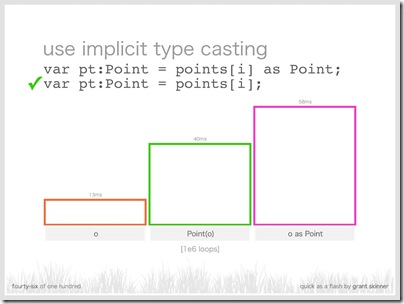
“One hundred slides on Flash optimization, covering general theory, code, media, and graphics,” by Grant Skinner.

Click to open the slides in a new window

These slides are recommended to any Flasher who seeks for serious code optimization and extreme performance improvement.

Note: When entering the page, press Left or Right to navigate the slides.

23 April 2010

Links about Flash vs others

Since the event that Flash is not supported by Apple’s latest “magical” gadget – the iPad, there came a lot of debates with Flash platform against others, from HTML5 (the biggest), to it’s poor performance on MAC/iPhone OS and even to user experiences in touch devices,…

This post of mine is to bookmark any interesting read related to or address those debates, especially, the so-called “The Great Flash vs HTML5 Debate of 2010”. I admit that I’m bias so maybe most of the links here are pro-Flash. Anyway, you can read the comments for counter-arguments but I’ve seen a lot of *bullshit* yell-outs against Flash with no proof or reasonable points at all.

I’ll update this post regularly whenever I come across any read-worthy articles (and sort them in chronological order).

20 April 2010

Simple AS3 Line Smoothing

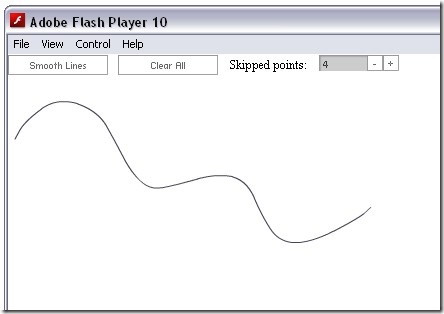
While researching for drawing tools, I’ve come up with a simple implementation of a pencil tool and line smoothing.

Here’s the idea:

  • Capture the points drawn by pencil tool in an array.
  • Filter a new points array from the original one by skipping points in the middle (to reduce turns & angles)
  • Finally, use a simple point-to-point curve drawing algorithm. I use sample code from this article by gskinner.com

The result:

Click to view the demo

You can find the source of this demo here.

[Vietnamese tag: Làm mượt nét vẽ đơn giản với ActionScript]

28 March 2010

as3signals: new approach for AS3 Events

There are times you may find that the built-in events of AS3 are limited and even troublesome. Here are some circumstances that EventDispatchers turn against developers:
  1. Objects MUST extend EventDispatcher in order to be able to dispatch events. Implementing IEventDispatcher alone is impossible because the event target is read-only and you cannot change it from outside of EventDispatcher.
  2. It’s difficult to manage events. There’s no way you can remove all event handlers attached to an event dispatcher at once. So in some cases, you don’t remove them properly and they start causing bugs. (BTW, using weak references is not reliable and not recommended.)
  3. You cannot pass extra data to you listener unless you extends a new Event object
  4. You cannot set up your interface in a way that it can enforce implementing classes to dispatch the required events.
  5. On performance perspective, creating objects is one of the most evil things. That’s why any advanced programmers must know and practically use objects pool. However, we are still wasting a lot of resources creating event objects, especially repetitive events like mouse move or enter frame.
  6. Read here for more critiques on AS3 events
So in order to address those issues, Robert Penner has adopted an alternative to AS3 events namely as3signals. (Follow the link for more info and get the library)

21 March 2010

AS3 Type Conversion & Common Mistakes

In this article, I’ll discuss some common mistakes that AS3 developers (including myself) often make when working with (implicit) type conversion.

1. Check whether a dynamic property is set

Dynamic properties can be added to dynamic object at run-time. Consequently, there’s often a need to test whether they are set before using them.

Here’s how some developers do it:

  1. var initObj: Object = {embed: true, color: 0xFF0000, text: "Hello" };
  2. /* ... */ 
  3. if (initObj.embed) { /*apply embed*/ }
  4. if (initObj.color) { /*apply this color*/ }
  5. if (initObj.text) { /*apply this text*/ }

The first test with Boolean is ok. But be careful when the input for color is black (0x000000) or the text is empty (“”). In that case, zeros and empty strings casted to Boolean equal false, and definitely the code will run incorrectly.

So, the best practice to check whether a dynamic property is set is to do as following:

  1. if (initObj.embed != undefined)
  2. if (initObj.color != undefined)
  3. if (initObj.text != undefined)

06 February 2010

Happy Vietnamese New Year 2010

It been a while I haven't done any animation/e-card for my dear friends. This year, I want to make something different to mark my mature in the Flash carear after 2 years. Here it is (click on the thumb to open the flash movie:

HAPPY VIETNAMESE NEW YEAR 2010!
WELCOME THE YEAR OF THE TIGER!

facebook

The images are loaded from my FaceBook friends list.

You can find the source code of this app here.

Update 14-June-2010: Profile picture URLs were fetched once via FaceBook API tester and stored in an embedded XML. They may be outdated over time.

23 January 2010

Quick Note on Local to Global in Papervision3D

Normally, if you want to get the scene coordinates of a child 3D object, use these properties:

  1. var x: Number = child.sceneX;
  2. var y: Number = child.sceneY;
  3. var z: Number = child.sceneZ;

However, if you want to get the screen coordinates of a local point other than the object’s original position (for e.g. side of a plane, some random points on a surface of a sphere…), then you have to deal with Matrix3D transform.

Don’t worry, you don’t need to understand what Matrix3D is because I don’t either :). Let’s use what people have concluded here:

If local to global is:

child.transform.calculateMultiply(parent.world, child.transform);

then global to local is:

child.transform.calculateMultiply(Matrix3D.inverse(parent.world), child.transform);

There are 2 things to note with above conclusion:

  • I have to invert method’s arguments (from what’s originally stated in the post) to get the correct conversion. I’m using PV3D 2.1
  • I haven’t tried the global to local method, hence I don’t guarantee it works. The global to local transform works correctly.

So here’s how I convert any local positions to global:

  1. var matrix: Matrix3D = Matrix3D.IDENTITY; //a recommended way to create new Matrix3D
  2. matrix.n14 = localX;
  3. matrix.n24 = localY;
  4. matrix.n34 = localZ;
  5. matrix.calculateMultiply(child.parent.world, matrix); //child must be a DisplayObject3D
  6. var scenePos: Number3D = new Number3D(matrix.n14, matrix.n24, matrix.n34);

If you want to convert the rotation as well, use Matrix3D.copy() to copy all transformation info from the child object. And then after calculateMultiply(), apply the matrix to your scene object with DisplayObject3D.copyTransform().

[Vietnamese Tag – Chuyển đổi tọa độ local sang global trong Papervision3D]